VB6ToLiveCodeDemo.zip
FmPro Migrator Platinum Edition 7.36 Includes an updated graphic and compatibility with LiveCode Commercial Edition 7.0 for VB6 to LiveCode conversions.
Top 10 Features
 Conversion of VB6 forms into LiveCode cards, with code added to individual card objects [Uses: LiveCode Commercial Edition].
Processing of a wide variety of BASIC syntax source files from multiple BASIC IDEs.
(Including, but not limited to: Visual Basic, VBScript, VBA, PowerBasic, ZBASIC/FutureBasic and RealBasic.)
Quickly process files within all subdirectories of a selected source directory.
Converted files are saved as .lc files or individual cards within a new LiveCode stack file.
Save many hours of manual retyping, performing the initial code conversion within seconds.
Supported statements include: DIM,LET, FOR/NEXT/LOOP/WHILE, SELECT/CASE, FUNCTION/SUB definitions and many more.
Common functions are remapped into LiveCode code: Trim(),Len(),Exit,Inc/Dec,LCase(),UCase(),XOr and many more
Sub/Functions are converted into LiveCode "on HandlerName/function FunctionName" definitions closed with "end HandlerName/FunctionName"
SELECT CASE code is converted into LiveCode code with "break" statements added to close each CASE block.
Convert older single-platform BASIC code into multi-platform LiveCode projects deployable on desktop, server, web and mobile platforms.
Description
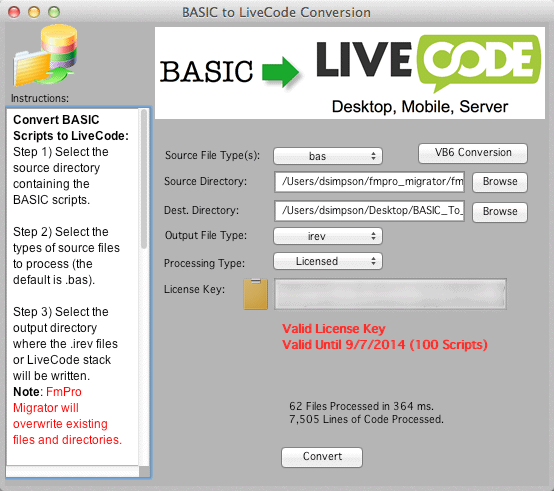
The BASIC to LiveCode Conversion Service included with FmPro Migrator Platinum Edition saves LiveCode developers many hours of tedious and error-prone work converting BASIC files into LiveCode code. FmPro Migrator Platinum Edition efficiently traverses all subdirectories of any specified source directory, locating and converting all of the files it has found with the specified file extension (.bas, .vba, .vbs or .txt). The converted files are either saved as folders and .lc files or as individual cards within a new LiveCode stack file.
|
BASIC to LiveCode Conversion Pricing
|
FmPro Migrator Platinum Edition includes a BASIC to LiveCode License Key (Unlimited Script Quantity - 1 Year Duration)
|

The features and benefits of using the BASIC to LiveCode Conversion Service include:
Converts VB6 Forms into LiveCode Cards in Seconds - Even large VB6 projects consisting of hundreds of forms can be converted into a new LiveCode stack within a matter of seconds. As part of the automated conversion process, object-specific code is retrieved from the .FRM file, converted and inserted into the individual LiveCode card objects.
Wide Range of BASIC Compilers Supported - The BASIC to LiveCode Conversion Service includes support for a wide variety of BASIC compilers and interpreters. The list of officially supported versions of BASIC include: Microsoft Visual Basic, VBScript, VBA, PowerBasic, ZBASIC/FutureBasic and RealBasic. File from unsupported compilers will still benefit from the conversion of the of the most commonly used BASIC keywords.
High Performance Processing - Performing manual processing of even the most common BASIC keywords for a large project could take days or even weeks of work. FmPro Migrator reduces this initial conversion phase for most projects to just a few seconds of processing time. All conversion projects will require manual work in order to reconcile differences between development environments. But using an automated process for the initial conversion phase of the project means that LiveCode developers can immediately start work on the remaining project development tasks. FmPro Migrator also provides a quick overview of the size of the conversion effort. Within a few seconds you will know how many files and lines of code are involved in your entire project.
Switch to LiveCode for Multi-Platform Compatibility - Many BASIC development environments were designed only for single-platform deployment. The LiveCode development platform makes it possible to reuse code across the web, desktop (Mac, PC or Linux) server and mobile platforms.
An Economical Learning Tool - Are you new to the LiveCode platform? Do you have thousands of lines of BASIC code scattered in dozens of different project directories? The BASIC to LiveCode Conversion feature is an indispensable tool which can help you quickly get up to speed converting your existing code to the LiveCode platform.
|
Private/Public Subroutine and Function Conversion - BASIC Subroutines and Functions are converted into handlers and functions within the converted LiveCode code. Private Subroutines become private commands, and public Subroutines become regular handlers. The End Sub/End Function keywords are converted into End <Sub/Function Name> to complete each Subroutine or Function. The ByVal keyword has been replaced with the @ symbol, which passes the variable by reference into the handler.
|
Private Sub List1_DragDrop(ByVal Source As String, X As Single)
If Source = "*****" then ' Beep if string found
Beep
End If
Return Trim(Source) ' Return trimmed value
End Sub
Public Sub Command1_Click()
dim Payment as single
dim LoanIRate as single
dim LoanDuration as integer
dim LoanAmount as integer
If IsNumeric(Amount.Txt) Then
LoanAmount = Amount.Text
Else
MsgBox "Please enter a valid amount"
End If
End Sub |
Private command List1_DragDrop @Source X
If Source = "*****" then -- Beep if string found
Beep
End If
Return char 1 to -1 of (Source) -- Return trimmed value
end List1_DragDrop
on Command1_mouseUp
     local Payment

                       local LoanIRate

                       local LoanDuration

                       local LoanAmount
     If isNumber(Amount.Txt) Then

            put Amount.Text into LoanAmount

       Else

            answer "Please enter a valid amount"

       End If

  end Command1_mouseUp
|
BASIC Code |
LiveCode Code |
Code Comments and Indenting - Comments and most code indenting will be passed thru into the the commented LiveCode code unchanged in order to improve readability as well as documentation. Variable definitions are modified to remove size info, and BASIC variable name suffix characters are removed for assignment and definition statements. |
' Data Reduction Program +++++ Module #1 +++++
' By David Simpson 12/8/85
' Copyright (c) 1985
LIBRARY "ToolLib"
Program.Name1$ = "Sentry D.R.(old) 618-000"
DIM D$(135) : REM variable which will contain one line of text
DIM C$(25) : REM bad sizes,bad id code to be sent to error message.
DIM File1$(256) :REM used for " FMT" -- input data file
DIM File2$(256) :REM used for ".SN" -- list of sn file
DIM File3$(256) :REM used for ".DEV" -- number of devices file
Page.Count% = 1 : REM count the number of pages of data
Line.Count% = 0
Page.Width2% = 8 : REM number of columns of data across page
Page.Width% = 81
Page.Length% = 64
Max.Sn% = 1000 : REM maximum devices which can be processed
Buffer.Size% = 3750 : REM number of sn of data read in by calc
Max.Parameters% = 75 : REM the maximum number of parameters
Max.Sizes% = 50 : REM the maximum number of measurements
DIM Update.Running.Status%(5500) : ' picture of window #3 for screen refreshing |
-- Data Reduction Program +++++ Module #1 +++++
                  -- By David Simpson 12/8/85


                  -- Copyright (c) 1985

                  library stack "ToolLib"


put "Sentry D.R.(old) 618-000" into Program.Name1


local D   --  REM variable which will contain one  line of text


local C    --  REM bad sizes,bad id code to be sent to error message.

local File1        -- REM used for  " FMT" -- input data file


local File2        -- REM used for  ".SN" -- list of sn file

local File3        -- REM used for  ".DEV" -- number of devices file


put 1 into Page.Count -- REM count the number of pages of data


put 0 into Line.Count


put 8 into Page.Width2 -- REM number of columns of data across page


put 81 into Page.Width


put 64 into Page.Length


put 1000 into Max.Sn -- REM maximum  devices which can be processed

put 3750 into Buffer.Size -- REM number of sn  data  read in by calc


put 75 into Max.Parameters -- REM the maximum number of parameters


put 50 into Max.Sizes -- REM the maximum number of measurements


local Update_Running_Status --  -- picture of window #3 for screen refreshing
|
BASIC Code |
LiveCode Code |
SELECT/CASE Conversion - SELECT/CASE statements are converted into switch/case statements in LiveCode. The CASE ELSE keywords become the default CASE condition and a break keyword is added at the end of each CASE block. Once again, the ByVal keyword has been replaced with the @ symbol, which passes the variable by reference into the handler. |
SUB SetFifoTrigger(BYVAL port AS INTEGER, BYVAL level AS INTEGER) PUBLIC
SELECT CASE level
CASE 1
level = "&H1F" ' 1 byte
CASE 4
level = "&H4F" ' 4 bytes
CASE 8
level = "&H8F" ' 8 bytes
CASE 14
level = "&HCF" ' 14 bytes
CASE ELSE
level = "&H00" ' disable FIFOs
END SELECT
END SUB
|
on SetFifoTrigger @port @level
switch level

                       CASE 1

                            put "&H1F" into level -- 1 byte

                       break

                       CASE 4

                            put "&H4F" into level -- 4 bytes

                       break

                       CASE 8

                            put "&H8F" into level -- 8 bytes

                       break

                       CASE 14

                            put "&HCF" into level -- 14 bytes

                       break

                       default

                            put "&H00" into level -- disable FIFOs

                       break

                       end switch
end SetFifoTrigger
|
BASIC Code |
LiveCode Code |
| Loop Conversion - FOR/NEXT, WHILE and LOOP statements are converted into the simplified repeat/end repeat keywords used in LiveCode. |
flag1% = 0 ' flag to enable WHILE statement
IF Num.To.Override% > 0 THEN flag1%=1
' do not remove devices which are overridden (control unit devices)
WHILE flag1%=1
FOR b% = 1 TO Devices%
FOR C% = 1 TO Num.To.Override%
' make sure that overridden devices are not removed
IF Sn.List%(b%) = Override.List%(C%) THEN Fail.Flags2%(b%) = 2
NEXT C%
NEXT b%
flag1% = 0 ' disable WHILE statement
WEND |
put 0 into flag1 -- flag to enable WHILE statement
IF Num.To.Override > 0 THEN flag1=1
-- do not remove devices which are overridden (control unit devices)repeat while flag1=1
repeat with b = 1 TO Devices
repeat with C = 1 TO Num.To.Override
-- make sure that overridden devices are not removed
IF Sn.List(b) = Override.List(C) THEN Fail.Flags2(b) = 2
end repeat
end repeat
put 0 into flag1 -- disable WHILE statement
end repeat
|
BASIC Code |
LiveCode Code |
| Variable Renaming - BASIC variables are modified to remove the data type suffix characters including $, % and # characters. For variables on the left hand side of the assignment operator and DIM statements the variable names are also checked against the list of LiveCode keywords, and renamed by adding an underscore character suffix if a name conflict has been found. REDIM statements are commented out, because a REDIM statement can either clear a BASIC array or resize the array. Variable assignments involving arrays (single or multi-dimensional) are converted into LiveCode arrays using square brackets instead of parenthesis. |
Public Const pi As Double = 3.141592
Dim Names$(1 to 16) As String
global MyArray%(20)
static IntArray%(10) As Integer
ReDim DynArray(UserCount)
ReDim Matrix(9, 9, 9)
dim Payment as single
dim LoanIRate as single
dim LoanDuration as integer
dim LoanAmount as integer
DIM Stack%(15,2) : REM pseudo-stack
Stack%(15,2) = 12345
T1$ = Temperatures.Item("Atlanta")
LoanDuration = Nothing |
constant pi_ = 3.141592
local Names
global MyArray
global IntArray
-- ReDim DynArray(UserCount)
-- ReDim Matrix(9, 9, 9)
local Payment
local LoanIRate
local LoanDuration
local LoanAmount
local Stack_ -- REM pseudo-stack
put 12345 into Stack_[15,2]
put Temperatures.Item("Atlanta") into T1
put empty into LoanDuration
|
BASIC Code |
LiveCode Code |
BASIC to LiveCode Function & Keyword Conversions
Some functions and keywords match so closely in functionality that a simple search & replace can be done on the code to perform the conversion. Some of these conversions are listed in this table.
| BASIC Function |
LiveCode Function |
| ASC() |
charToNum() |
| CHR$() |
charToNum() |
| Date() |
the short date of |
| DEBUG.PRINT |
put [output goes to message box in Rev IDE] |
| DEC() |
subtract 1 from () |
| DECODEBASE64() |
base64Decode() |
| DECODEURL() |
URLDecode() |
| ENCODEBASE64() |
base64Encode() |
| ENCODEURL() |
URLEncode() |
| EXIT SUB |
Exit |
| FN ANNUITY#() |
annuity() |
| INC() |
add 1 to () |
| INCR() |
add 1 to () |
| ISNUMERIC() |
isNumber() |
| LCASE() |
toLower() |
| LEN() |
length() |
| LENB() |
length() |
| LOWERCASE() |
toLower() |
| LTRIM() |
char 1 to -1 of () |
| MSGBOX |
answer |
| NIL |
empty |
| NOTHING |
empty |
| SQR() |
sqrt() |
| SUB CLICK() |
on mouseUp |
| SUB DBLCLICK() |
on mouseDoubleUp |
| TRIM() |
char 1 to -1 of () |
| UCASE() |
toUpper() |
| UCASE$() |
toUpper() |
| UCASE$$() |
toUpper() |
| UPPERCASE() |
toUpper() |
| VAL() |
value() |
| VBCR |
return |
| VBCRLF |
CRLF |
| VBLF |
LF |
| WEND |
end repeat |
| XELSE |
else |
| XOR |
bitXor |
| |
|
| |
|
Demo Mode
Due to the complexity associated with any code
conversion project, it is recommended that a small test project be
completed prior to starting the full conversion project. By default,
FmPro Migrator Platinum Edition will process 5 scripts in demo mode without requiring a license key. There is also additional information in the FmPro Migrator BASIC to LiveCode Conversion Manual (PDF).
Requirements
Requirements:
FmPro Migrator Platinum Edition - FmPro Migrator Platinum Edition includes the BASIC to LiveCode Service licence key providing unlimited usage of this feature throughout the duration of the license key.
LiveCode IDE
VB6 Form and Code Conversion
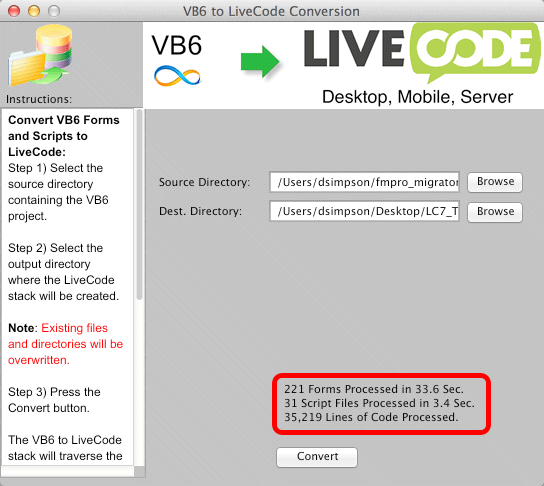
The VB6ToLiveCode Conversion feature is included with FmPro Migrator Platinum Edition. This feature is implemented as a LiveCode stack running within the LiveCode Commercial Edition IDE. VB6 forms and code are converted into a new LiveCode stack, having the converted Visual Basic code directly embedded within the newly created card objects.
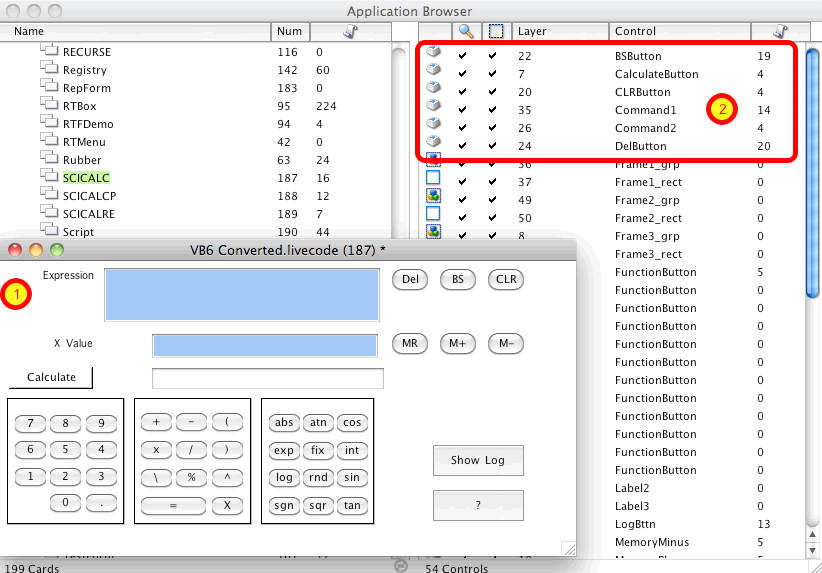
This screen shot (1) shows the VB6 SCICALC.frm form (scientific calculator) converted into a LiveCode card. In the background (2) the objects on this card are being displayed within the LiveCode Application Browser, also showing the number of lines of code which have been inserted into the objects when they were created. On the left hand column the SCICALC card also has 16 lines of code placed into the card script. The card script will include any scripts which are not assigned to any individual form object, and which might be called globally by any of the objects.
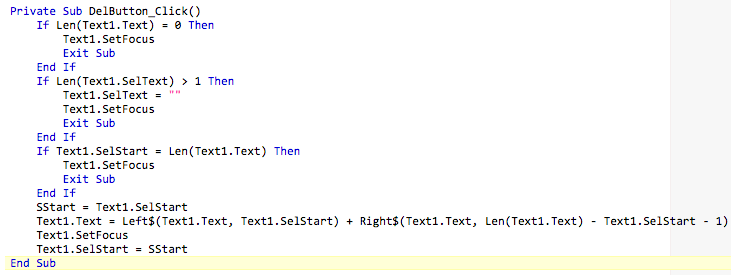
The original VB6 DelButton_Click() Sub code shown above, has been converted into the LiveCode code shown below.
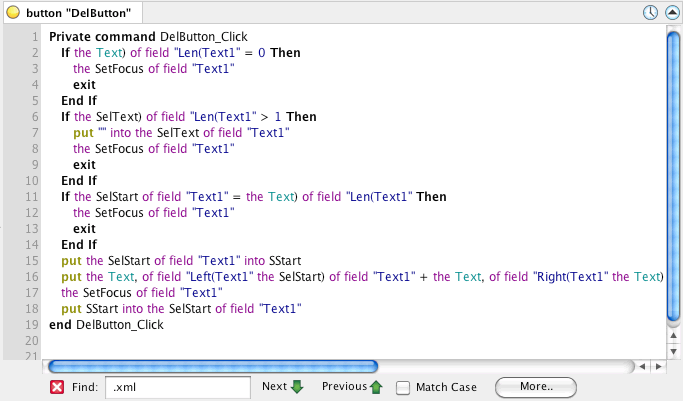
The LiveCode version of the script has been syntactically converted to match LiveCode syntax as shown above. The dot notation used to reference properties has been replaced with the equivalent LiveCode script. These object property names will need to be manually changed to reflect the properties of LiveCode objects.
| VB6 Support Form Objects |
| PictureBox |
| ImageBox |
| Label |
| TextBox |
| Frame |
| CommandButton |
| CheckBox |
| OptionButton - (grouped if within a Frame) |
| ComboBox |
| ListBox |
| HorizontalScrollbar |
| VerticalScrollbar |
| DriveListBox |
| DirectoryListBox |
| FileListBox |
| Slider |
| TabDlg (Tab Control) |
There are 17 commonly used VB6 form objects converted into equivalent LiveCode objects, shown in this table.