

FmPro Worksheet - revdberr Troubleshooting
on MacOS X
Error Message : Can't open database revdberr, invalid
database type - whenever FmPro Worksheet executes commands.
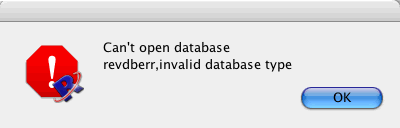
[FmPro Worksheet revdberr, invalid database Error Dialog on MacOS X]
Solution: Either install
the OpenLink Software Universal Data Access (UDA) ODBC-JDBC Lite Bridge
driver software or add a symbolic link named "3.51" from
the iODBC 3.52 framework.
First, open the MacOS X Console application (/Applications/Utilities/Console)
to see if errors have been generated by FmPro Worksheet. An example
error within the Console log may look like the following:
2005-08-20 10:32:54.968 FmPro Worksheet 1.02[2853]
          CFLog (21): Error loading /Users/<loginaccount>/fmpro_worksheet/FmPro
          Worksheet 1.02.app/Contents/MacOS/externals/database_drivers/dbodbc/Contents/MacOS/dbodbc:
          error code 4, error number 0 (Library not loaded: /Library/Frameworks/iODBC.framework/Versions/3.51/iODBC
This error means that FmPro Worksheet is looking for the
iODBC 3.51 framework but it was not found. This error could occur if
the OpenLink Software Universal Data Access (UDA) ODBC-JDBC Lite Bridge
driver software was not installed. This error also occurs after installing
a later version of OpenLink Software with a higher version number than
3.51. To troubleshoot this problem further, use the MacOS X Terminal
to verify which version of iODBC software was installed.
Using the Terminal, type the following:
cd /Library/Frameworks/iODBC.framework/Versions

          ls -l
it is likely that the following directory structure will
be displayed:
drwxrwxr-x 5 root admin 170 Oct 3 2004 3.52

          lrwxr-xr-x 1 root admin 4 Aug 19 16:30 Current -> 3.52

          $loginaccount /Library/Frameworks/iODBC.framework/Versions
This means that the iODBC 3.51 framework won't be found
by the FmPro Worksheet executable because the iODBC 3.52 framework has
been installed. The solution to this problem is to create a symbolic
link from the 3.52 framework to 3.51, which will then be found by FmPro
Worksheet.
Type the following commands to create the symbolic link:
sudo ln -s 3.52 3.51
Now FmPro Worksheet should be able to find the iODBC 3.51
symbolic link, which actually is mapped to the iODBC 3.52 framework
as shown in the following /Library/Frameworks/iODBC.framework/Versions
directory listing:
lrwxr-xr-x 1 root admin 4 Aug 20 10:58 3.51 ->
          3.52

          drwxrwxr-x 5 root admin 170 Oct 3 2004 3.52

          lrwxr-xr-x 1 root admin 4 Aug 19 16:30 Current -> 3.52

          $loginaccount /Library/Frameworks/iODBC.framework/Versions




