
FmPro
Script Diff Demo Available for download...
How to copy scripts between FmPro
Script Diff and FileMaker Pro
Pasting FileMaker Pro ScriptMaker Scripts into FmPro
Script Diff
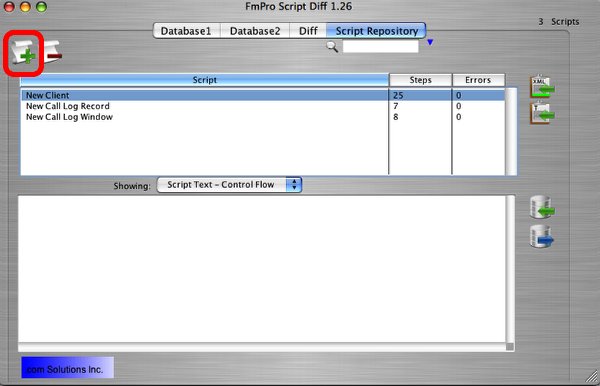
FileMaker Developer/Advanced enables the copying and pasting
of ScriptMaker scripts using the ClipBoard. To import one or more scripts,
copy the scripts to the ClipBoard within FileMaker, then click the Add
Script(s) button within FmPro Script Diff. All of the scripts on the
clipboard will be converted from XML to Text, errors will be noted and
the information will be stored within FmPro Script Diff within a few
seconds. It is not necessary to export a DDR, as all of the necessary
information required to define each script is retrieved from the ClipBoard.
Individual script steps can also be imported into FmPro Script Diff,
and will be automatically named "Untitled" followed by an
incrementing number.
Copying Scripts into FileMaker Pro
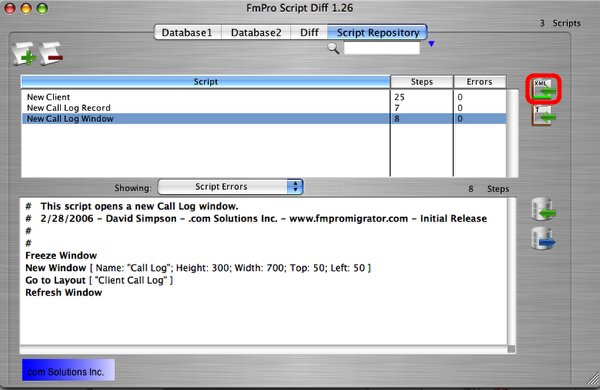
One or more scripts can be copied from FmPro Script
Diff to FileMaker by selecting the scripts and clicking on the Copy
Script(s) to ClipBoard button. Once the XML which defines the scripts
has been put onto the clipboard, selecting Paste from the Edit menu
within FileMaker imports the scripts into ScriptMaker. All attributes
for each script are copied into FileMaker, including the name and
the ID number of the script.
FileMaker Pro 11 Compatibility Note:
Attempting to copy FileMaker Pro 10 scripts into FileMaker Pro 11 will often cause unexpected results.
For instance the Print Setup step contains either HEX encoded binary data for FileMaker Pro 11, or base64 encoded data for FileMaker Pro 9 - 10.
There are also differences in the XML encoding for single-line scripts, which will prevent the proper parsing of the XML for the current Script Step as well as
any additional Script Steps or Scripts. Within FileMaker Pro 10 scripts, a single line script
will look like this:
<Script id="37" name="-" includeInMenu="False" runFullAccess="False"/>
And in FileMaker Pro 11 the same script will look like this:
<Script includeInMenu="True" runFullAccess="False" id="15" name="-">
</Script>
Therefore it is not recommended that scripts be copied between different versions of FileMaker Pro when using FmPro Script Diff.
FmPro Script Diff includes two new version menu items under the File menu which enable you to specify which version of FileMaker Pro you are using, so that Scripts are put onto the clipboard in the proper format. If FileMaker Pro 11 scripts are detected on the clipboard, FmPro Script Diff will automatically select the FileMaker 11 menu item, and will store this info within its database.




